


Ligue Wireless CarPlay ao Guia de Instalação do Quadro de Instrumentos Digital Audi VW
Configuração de CarPlay sem fios e Huawei HiCar para Clusters Digitais Audi / VW
Utilize este guia para ligar o Apple CarPlay ou o Huawei HiCar num cluster digital iKAGOO Audi / Volkswagen baseado em Linux compatível, encaminhar o som pelo percurso de áudio de fábrica correto, diagnosticar problemas de ligação ou autorização e determinar quando é realmente necessária uma verificação de firmware.
Como Funciona o CarPlay ou o HiCar num Cluster Digital iKAGOO Audi / VW?
O cluster digital trata principalmente da interface visual. Abra o menu Conectividade do telemóvel do cluster, selecione CarPlay ou HiCar e emparelhe o telefone através do percurso de ligação suportado. Para o som, o telefone deve normalmente utilizar o Bluetooth original do veículo, AUX ou o percurso de áudio da unidade principal de fábrica, em vez de tratar o cluster como o dispositivo de saída de altifalante principal.
Interface visual
Mapas, menus e visuais de ligação de telefone suportados aparecem no cluster digital.
Circuito de áudio de fábrica
A música e a voz de navegação devem normalmente ser encaminhadas através do sistema de áudio original do veículo.
Resolver problemas antes de atualizar
O emparelhamento, o encaminhamento de áudio e a autorização devem ser verificados antes de utilizar um percurso de firmware online ou USB.
A Que Clusters Digitais Audi e Volkswagen se Aplica Este Guia?
Esta página destina-se a clusters digitais iKAGOO Audi / Volkswagen baseados em Linux compatíveis ou sistemas de retrofit de cockpit digital que fornecem um percurso de Conectividade Telefónica para Apple CarPlay e/ou Huawei HiCar.
Utilize este guia quando
- O veículo utiliza um percurso de retrofit de cluster digital Audi ou Volkswagen compatível.
- A interface do cluster inclui o menu suportado de Conectividade Telefónica / ligação de smartphone.
- Está a ligar um iPhone para Apple CarPlay ou um telefone Huawei compatível para Huawei HiCar.
- O percurso de áudio Bluetooth de fábrica, AUX ou da unidade principal original ainda está disponível para o som.
Não trate isto como um guia universal para
- Unidades principais Android ou ecrãs multimédia Android.
- Substituições de ecrã MIB de fábrica.
- Caixas CarPlay genéricas de terceiros.
- Qualquer cluster Audi ou Volkswagen cujo hardware, estrutura de menu ou percurso de firmware não tenha sido confirmado.
Os exemplos de veículos são exemplos de identificação, não uma lista completa de compatibilidade. Os registos de suporte existentes podem referir veículos como Volkswagen Golf 7, Volkswagen Passat B8 ou Audi A4 B8, mas a compatibilidade deve ainda ser confirmada a partir do ano exato do veículo, painel de instrumentos, quadrante original e versão do quadrante digital instalada.
O que deve verificar antes de ligar o CarPlay ou o Huawei HiCar?
Evidências do veículo e do quadrante
- Modelo e ano do veículo.
- Fotografia nítida do painel de instrumentos / volante.
- Fotografia do menu Conectividade do Telefone do quadrante digital.
- Ecrã atual de software / versão se houver suspeita de um problema de firmware.
Evidências do telefone e do áudio
- Modelo do telefone e versão atual do sistema operativo.
- Bluetooth e Wi-Fi ativados quando exigido pela rota de ligação suportada.
- Bluetooth original do carro, AUX ou entrada de áudio de fábrica disponível.
- Qualquer mensagem de erro exata registada antes de os ajustes serem repostos.
Não comece com uma atualização de firmware. Se o CarPlay ou o HiCar falhar, determine primeiro se o problema é a rota de emparelhamento do telefone, o encaminhamento de áudio do veículo, o estado de autorização ou a versão de firmware. Uma atualização de firmware não é o primeiro passo de resolução de problemas.
Como ligar o Apple CarPlay ou o Huawei HiCar ao quadrante digital
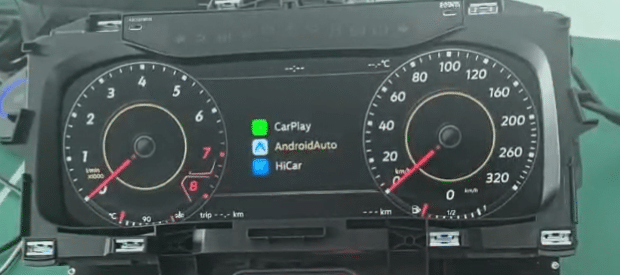
Abrir o Conectividade do telemóvel interface no quadrante digital. Em algumas versões de firmware, a mesma área pode ser apresentada como Interligação com telemóveis. Este é o menu de ligação utilizado pela rota de ligação de smartphone suportada; não emparelhe a partir de menus de sistema não relacionados, a menos que o suporte iKAGOO lhe indique especificamente para o fazer.
Ligar o Apple CarPlay
Selecione o CarPlay ícone no menu Conectividade do Telefone do quadrante digital. No iPhone, abra Definições → Bluetooth, encontre o nome do dispositivo apresentado pelo quadrante e conclua os pedidos de emparelhamento apresentados no telefone e no quadrante.
- Utilize o menu correto: comece em Conectividade do Telefone, não numa página aleatória de Bluetooth das definições gerais.
- Permita os pedidos: não cancele os ecrãs de permissão de ligação do telefone durante o primeiro emparelhamento.
- Depois de a ligação visual começar: confirme que o telefone também está ligado ao Bluetooth original do veículo ou à via de áudio de fábrica necessária para o som.
- Se as imagens funcionarem mas não houver som: continue para a secção de áudio abaixo em vez de eliminar repetidamente o emparelhamento do CarPlay.
Ligar Huawei HiCar
Selecione o HiCar ícone no painel digital e, em seguida, siga as instruções no painel e no telefone Huawei. Mantenha o Bluetooth e o Wi-Fi ativados durante o processo de configuração suportado.
- A variação do telefone é importante: os ecrãs exatos podem variar consoante o modelo do telefone Huawei e a versão do HarmonyOS.
- Não reinicie às cegas: se o emparelhamento falhar, registe primeiro o ecrã atual do painel e o modelo do telefone.
- Verifique o percurso de áudio do veículo: uma ligação visual bem-sucedida não significa automaticamente que o sistema de áudio original tenha selecionado a saída de telefone correta.
- Se o menu não corresponder: pare e confirme a rota de firmware instalada antes de aplicar instruções de outra versão do painel.
Confirme o percurso de áudio de fábrica
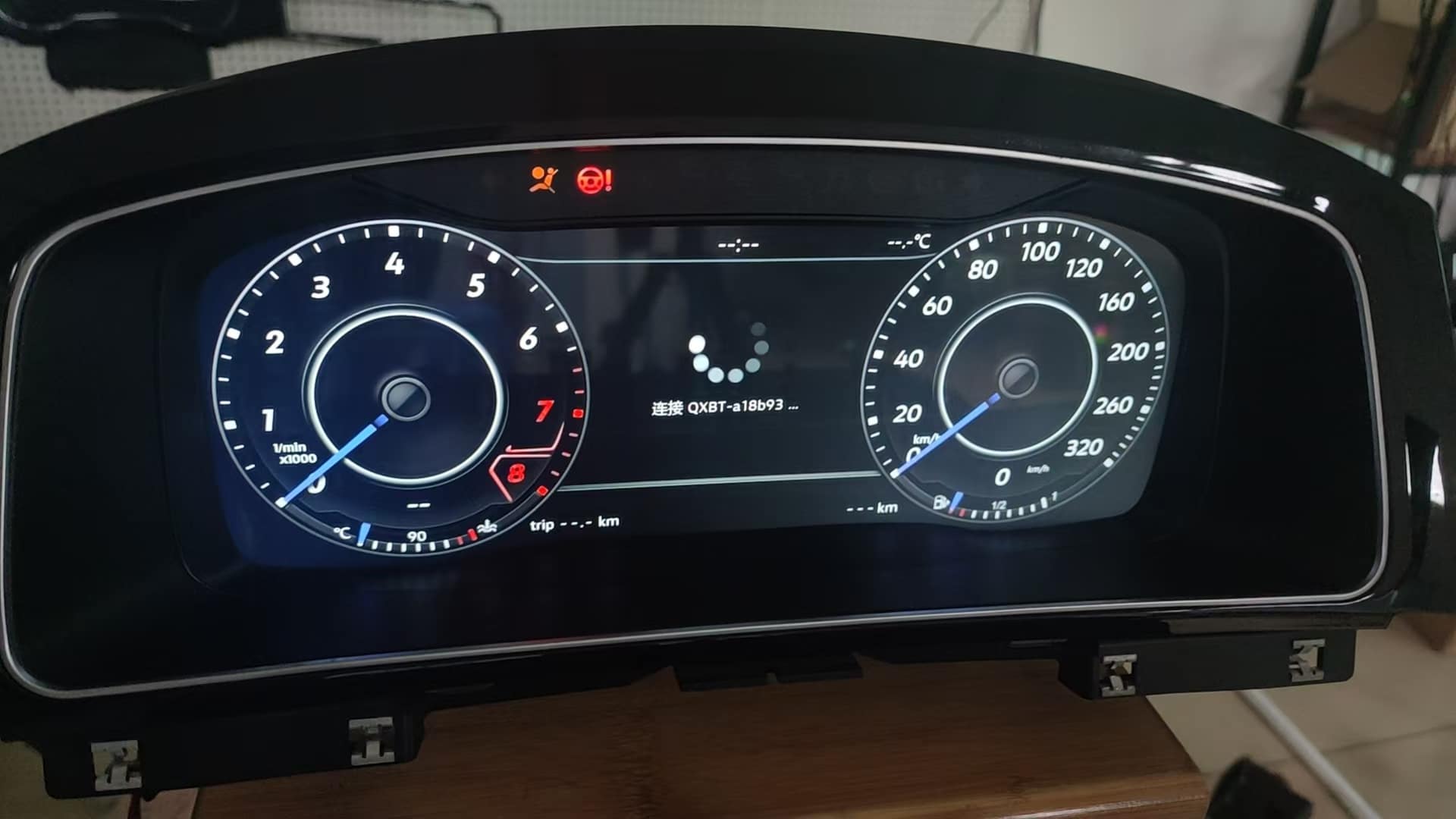
Depois de a interface de ligação do telefone aparecer no painel, reproduza uma fonte de áudio conhecida ou um aviso de navegação e confirme que o telefone está a enviar áudio através do Bluetooth original do veículo, AUX ou percurso da unidade principal de fábrica exigido pela configuração do veículo.
- Não diagnostique “sem som” apenas com base no ecrã do painel.
- Verifique o dispositivo de saída de áudio ativo no telefone.
- Verifique a seleção da entrada Bluetooth ou AUX original do veículo.
- Verifique o volume da voz da aplicação de mapas separadamente se a música funcionar mas a voz da navegação não.
Verifique os controlos suportados no volante
Assim que a ligação estiver estável, teste apenas as funções do volante esperadas para o veículo confirmado, a configuração CANBUS e a configuração de firmware.
- O comportamento dos botões pode variar consoante a plataforma do veículo, o ano do modelo e a versão do volante.
- As funções suportadas de volume, faixa, menu ou relacionadas com voz podem depender da configuração CANBUS correspondente.
- Se um botão não se comportar como esperado, verifique a configuração do veículo e do CANBUS antes de assumir que o painel digital está avariado.
Porque é que o CarPlay ou o HiCar aparecem no painel digital mas não têm som?
Mais comummente, a ligação visual está a funcionar mas o áudio do telefone não está encaminhado para o sistema de áudio original do veículo. O painel digital iKAGOO é principalmente a interface visual e de dados do veículo; a música e a voz da navegação devem normalmente usar o Bluetooth de fábrica, AUX ou o percurso de áudio da unidade principal original.
| Sintoma | Percurso provável a verificar | Ação recomendada |
|---|---|---|
| O CarPlay aparece, mas a música e a voz da navegação estão silenciosas | O áudio do telefone não está a chegar ao percurso de áudio original do veículo | Ligue ou selecione o Bluetooth original do veículo, AUX ou a entrada de áudio de fábrica necessária. |
| O telefone está emparelhado apenas com o cluster | A ligação do ecrã está ativa, mas a unidade principal de fábrica não está a receber áudio | Emparelhe ou volte a ligar o telefone ao sistema de áudio original da unidade principal, conforme exigido pelo veículo. |
| O som funciona inicialmente, mas perde-se após a reconexão | O telefone pode ter selecionado uma saída de áudio ativa diferente após o arranque | Abra o seletor de saída de áudio do telefone e escolha novamente o sistema de áudio do veículo. |
| A música funciona, mas os avisos de voz do mapa não | A voz da navegação pode estar silenciada ou encaminhada de forma diferente | Verifique a definição de voz da aplicação de mapas, a saída de multimédia do telefone e a ligação de áudio do veículo. |
Regra prática: diagnostique o percurso do ecrã e o percurso de áudio separadamente. Um ecrã CarPlay / HiCar a funcionar prova que a ligação visual está ativa; isso por si só não prova que o sistema de áudio de fábrica selecionou a saída correta do telefone.
O que deve fazer se o cluster mostrar “Autorização perdida” ou falha de ligação?
Não continue a reiniciar o sistema sem primeiro registar o erro. Confirme a mensagem exata, o percurso de firmware atual e se a falha começou após uma mudança de versão.
Registe a falha antes de alterar as definições
- Fotografe ou grave a mensagem exata Autorização perdida / de falha de ligação.
- Registe o modelo e o ano do veículo.
- Fotografe o ecrã de conectividade do telefone e o ecrã da versão atual.
- Registe o modelo do telefone e a versão do sistema operativo.
Utilize o percurso de reautorização de hotspot suportado quando este erro se aplica
- Abra as definições de hotspot pessoal do telefone.
- Defina o nome do ponto de acesso como 1234.
- Defina a palavra-passe do hotspot para 12345678.
- No cluster digital, selecione Ligar.
- Se o percurso suportado pedir um reinício ou reposição, selecione Confirmar.
Importante: utilize esta reposição de hotspot apenas para o percurso de autorização / falha de ligação suportado descrito aqui. Não é o mesmo que o procedimento separado de hotspot OTA utilizado por algumas versões de atualização do cluster. Não altere um sistema que funciona normalmente só porque estas credenciais aparecem neste guia de resolução de problemas.
Se a reposição não restaurar a ligação suportada, guarde o vídeo do erro e as informações da versão e avance para a verificação do percurso de firmware. Não repita as reposições indefinidamente.
Quando deve verificar o firmware em vez de repetir o emparelhamento CarPlay ou HiCar?
Verifique o percurso do firmware quando o problema começou após uma atualização ou mudança de versão, quando a autorização não pode ser restaurada através do percurso de recuperação suportado, ou quando o menu do cluster não corresponde às instruções de ligação do hardware instalado. Não misture pacotes PQ e MQB e não utilize um pacote USB não verificado.
Atualização online
Utilize uma atualização online via hotspot do telefone apenas quando a compilação instalada e o percurso de suporte o permitirem especificamente.
atualização por USB
Utilize apenas um pacote correspondente à versão do cluster instalada. Não trate um ficheiro USB de outra plataforma como uma atualização genérica.
Percurso de ligação telefónica C33
Se a unidade instalada utilizar o percurso documentado de ligação a smartphone C33, desative essa função de ligação telefónica antes do procedimento de atualização online suportado.
Não force CarPlay, HiCar, atualização por hotspot ou flashing USB sem a informação da versão atual. Um percurso de atualização errado pode transformar um simples problema de emparelhamento num problema de compatibilidade de firmware.
Como Este Guia de CarPlay e HiCar para Audi / VW Foi Preparado
Este guia é mantido pela Equipa Técnica da iKAGOO em torno dos percursos suportados de ligação e suporte do cluster digital Audi / Volkswagen baseado em Linux documentados nesta página. Utiliza as referências reais do menu do cluster, imagens da interface CarPlay / HiCar, lógica de encaminhamento de áudio, procedimento de recuperação de autorização, limites de segurança do firmware e requisitos de evidência de suporte utilizados no artigo.
O que está diretamente documentado
Ponto de entrada de Conectividade Telefónica, referências da interface CarPlay e HiCar, encaminhamento de áudio de fábrica, credenciais de recuperação de Autorização Perdida e avisos sobre o percurso do firmware.
O que depende da versão
Os menus exatos, as funções de ligação telefónica suportadas, o comportamento do volante, o percurso C33 e o método de atualização de firmware podem variar consoante o hardware e o software do cluster instalado.
O que este guia não afirma
Não afirma que todos os veículos Audi / Volkswagen suportam as mesmas funções, nem que um pacote de software pode reparar hardware danificado, cablagem incorreta ou avarias não relacionadas do veículo.
Revisado: 2 de setembro de 2026
Objetivo: ajudar proprietários e instaladores a diagnosticar o percurso de ligação antes de reposições ou alterações de firmware desnecessárias.
Regra de verificação: quando a versão exata do cluster ou o percurso do veículo não forem claros, registe as evidências e confirme a compatibilidade antes de alterar o firmware.
Que Informações Deve Enviar Se o CarPlay ou o HiCar Continuarem a Não Funcionar?
Veículo e cluster
- Modelo e ano do veículo.
- Fotografia original do painel de instrumentos e do volante.
- Fotografia do menu de Conectividade Telefónica / CarPlay / HiCar do cluster digital.
- Ecrã da versão atual.
Evidência da falha
- Modelo do telefone e versão de iOS / HarmonyOS.
- Vídeo curto que mostra o emparelhamento falhado, o comportamento sem som ou a mensagem de autorização.
- Se o problema começou antes ou depois de uma atualização de firmware.
- Se o caminho de áudio Bluetooth ou AUX original do veículo funciona normalmente.
Recursos Relacionados do Painel Digital Audi \/ Volkswagen
FAQ do CarPlay e HiCar do Painel Digital Audi \/ VW
Porque é que o CarPlay aparece no painel digital mas não tem som?
A ligação visual e a rota de áudio são separadas. O painel pode mostrar a interface CarPlay enquanto o áudio do telefone ainda precisa de utilizar o caminho de áudio Bluetooth, AUX ou da unidade principal de fábrica do veículo original. Verifique a saída de áudio ativa do telefone e a fonte de áudio do veículo.
Onde devo iniciar a ligação CarPlay ou HiCar?
Comece pela Conectividade do telemóvel interface do painel digital. Em algumas versões de firmware pode aparecer como Interligação com telemóveis. Não comece a partir de menus de sistema não relacionados, a menos que o suporte confirme uma rota diferente para a sua versão instalada.
Como emparelho o Apple CarPlay na rota suportada do painel digital?
Selecione o ícone CarPlay em Conectividade do Telefone, abra Definições → Bluetooth no iPhone, encontre o nome do dispositivo apresentado pelo painel e conclua os pedidos de emparelhamento. Depois confirme que o telefone também está a utilizar o caminho de áudio original necessário do veículo.
Como ligo o Huawei HiCar?
Selecione HiCar no painel digital e siga as instruções apresentadas no telefone Huawei e no painel, mantendo o Bluetooth e o Wi-Fi ativados. Os ecrãs exatos podem variar consoante o modelo Huawei e a versão do HarmonyOS.
Que nome e palavra-passe de hotspot são utilizados para a rota suportada de recuperação de Autorização Perdida?
Para o procedimento específico de recuperação de autorização \/ falha de ligação documentado nesta página, defina o nome do hotspot como 1234 e a palavra-passe para 12345678. Não confunda isto com uma rota de hotspot de atualização OTA separada utilizada por outros procedimentos.
Devo atualizar o firmware imediatamente se o CarPlay ou o HiCar falharem?
Não. Primeiro verifique a rota de emparelhamento, o caminho de áudio original do veículo, a mensagem de autorização exata e a versão atual do firmware. Utilize uma atualização online ou por USB apenas depois de confirmar a rota correta correspondente à versão.
Posso misturar ficheiros de firmware PQ e MQB?
Não. O guia avisa especificamente para não misturar pacotes de atualização PQ e MQB. Utilize apenas o pacote e o método confirmados para a versão do painel instalada.
Os controlos no volante funcionam sempre da mesma forma?
Não. O comportamento suportado dos botões depende da plataforma do veículo, do ano do modelo, da versão do volante, da configuração CANBUS e do firmware. Verifique a rota confirmada do veículo antes de diagnosticar um botão como avariado.
Este guia abrange o Android Auto?
Este artigo é especificamente sobre as rotas suportadas Apple CarPlay e Huawei HiCar mostradas aqui. O suporte do Android Auto deve ser confirmado a partir da interface exata do painel e da versão de firmware, em vez de ser assumido a partir deste guia.
Este guia é para todos os modelos Audi e Volkswagen?
Não. Aplica-se apenas a painéis digitais Audi / Volkswagen baseados em Linux iKAGOO suportados, utilizando a rota documentada de ligação ao telefone. O modelo do veículo, o ano, o painel / quadro original e o hardware instalado ainda precisam de ser confirmados.
O que devo enviar ao suporte se o emparelhamento continuar a falhar?
Envie o modelo e o ano do veículo, uma foto do painel, uma foto do menu Conectividade do Telefone, o ecrã da versão, o modelo do telefone e a versão do sistema operativo, além de um vídeo curto que mostre a falha exata de emparelhamento, áudio ou autorização. Indique também se o problema começou antes ou depois de uma atualização de firmware.








Add comment