


Audi A4 B9 Virtual Cockpit Retrofit: Keep the Car, Change the Part That Feels Old
Audi A4 B9 Virtual Cockpit Retrofit: Keep the Car, Change the Part That Feels Old
If you are researching an Audi A4 B9 Virtual Cockpit retrofit, chances are the car itself is not the problem. You may still like the way it drives, know its history and plan to keep it for years. It is simply getting harder to ignore the conventional gauges every time you sit behind the wheel.
On supported 2017–2025 Audi A4 B9 and A5 B9 vehicles, the iKAGOO aftermarket route changes the driver-facing instrument area to a 12.3-inch 1920×720 digital cockpit and adds supported CarPlay Map Sync. Instead of building the project around a used OEM donor cluster, the product route is matched to the vehicle and remains connected to iKAGOO installation and after-sales support.
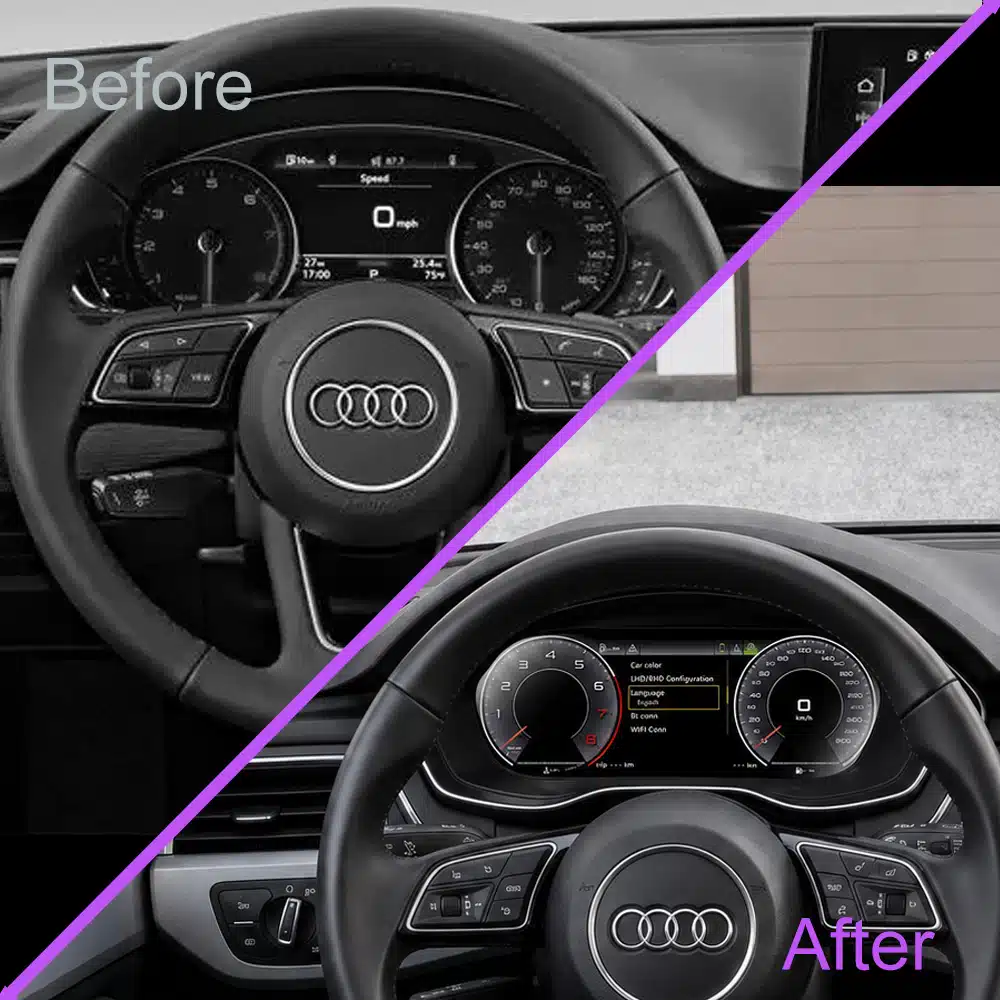
Why A4 B9 owners start considering a Virtual Cockpit retrofit
Most owners do not start here because the original cluster has failed. The purchase usually comes from repeatedly noticing that one area of the cockpit no longer matches how good the rest of the car still feels.
The car still deserves to stay.
You know its maintenance history. The seat still fits you. The engine, steering and cabin still do what you need every day.
Replacing the entire vehicle simply because newer cars have digital dashboards makes little practical sense. But that does not mean you have to spend another few years looking at the one part of the interior that now dates the car.
The navigation you actually trust is on your phone.
Apple Maps, Google Maps or another CarPlay navigation app is already part of the way many owners use the car. On the normal commute, display position barely matters.
It matters at an unfamiliar motorway exit, in another city or when traffic suddenly reroutes you. That is when putting supported navigation information into the driver-facing display becomes a practical upgrade rather than a cosmetic one.
After dark, the age difference is more obvious.
The B9's dashboard architecture, lighting and controls can still feel premium at night. That makes an older gauge layout directly behind the steering wheel more noticeable—not less.
Then you sit in another Audi with a full digital cockpit.
It may not drive better. It may not even be newer by very much. But the driver's seat feels like it belongs to another generation.
That is when the question changes from “Do I need another car?” to “Can I modernise the part of this car I look at every day?”
An Audi B9 cockpit upgrade should still look like an Audi when you are finished.
A generic tablet can make an old dashboard look modified. The purpose of this Audi A4 B9 aftermarket Virtual Cockpit route is different: change the part directly behind the steering wheel while keeping the surrounding B9 dashboard visually familiar.
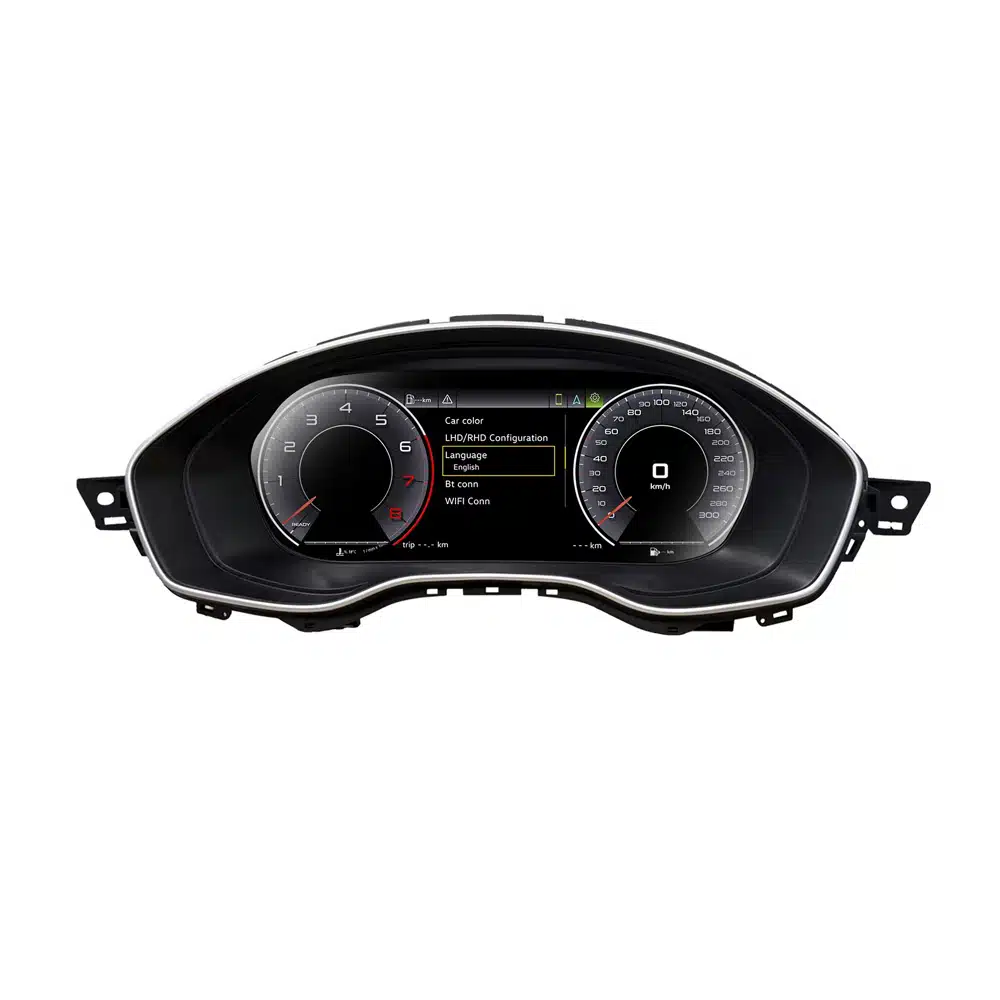
What an aftermarket Virtual Cockpit adds to an A4 B9
Replacing analogue-style gauges with an LCD is visually satisfying. But that alone is not the strongest reason to spend the money. A useful upgrade should also change what the display can do during normal ownership.
Keep the information you check every drive
Speed, RPM, fuel, trip information and supported vehicle prompts remain part of the matched instrument route.
Give CarPlay navigation somewhere more useful to appear
Supported CarPlay Map Sync gives the digital display a daily function beyond changing gauge graphics.
Buy a route for your vehicle—not a donor part
iKAGOO prepares the aftermarket route around the supported B9 application instead of asking the buyer to source a used donor cluster and assemble the project afterward.
Audi A4 B9 Virtual Cockpit Retrofit: OEM donor or iKAGOO route?
If genuine factory hardware is the main objective, an OEM Virtual Cockpit retrofit has a clear appeal. It is the Audi factory architecture.
But many owners searching for this upgrade are not collecting OEM parts. They want the car to feel newer, want navigation where they can actually use it, and want one seller to remain responsible for the supplied product.
OEM Virtual Cockpit does not automatically mean your CarPlay map appears inside the cluster.
On many B9 factory configurations, Audi's own navigation and phone-based CarPlay / Android Auto navigation use different display routes. Owners have documented situations where CarPlay navigation remains on the centre display while the Virtual Cockpit shows Audi navigation or a compass.
That makes Sincronização de Mapas do CarPlay much more important than another interface theme. It is one of the clearest reasons an owner using phone navigation every day may prefer the iKAGOO route.
| Questão de compra | iKAGOO aftermarket route | OEM donor retrofit |
|---|---|---|
| What are you trying to achieve? |
Modern daily-use cockpit Digital driver display, supported vehicle information and CarPlay Map Sync. |
Reproduce the original Audi Virtual Cockpit hardware architecture. |
| Phone navigation in the cluster |
A core product reason Supported CarPlay Map Sync is specifically part of this product route. |
Do not assume Apple Maps / Google Maps / Waze from CarPlay will display as a full cluster map on every B9 OEM configuration. |
| Used donor cluster required? |
No donor cluster sourcing Purchase the vehicle-specific aftermarket product. |
The project can involve sourcing the correct Virtual Cockpit hardware and related parts. |
| Proteção de Componentes | This product is not sold as an OEM donor-cluster conversion. Setup follows the supplied iKAGOO product route. | Component Protection is a documented part of many OEM donor-cluster retrofit projects. |
| Additional retrofit work | Product version, setup and support remain connected to the iKAGOO order. | Depending on the car, the project may involve an additional video connection, coding and configuration after physical installation. |
| Who supports the project afterward? |
One product/support history Vehicle review, supplied version, installation support and troubleshooting stay tied to the original order. |
Donor-part seller, installer, dealer and coder may be separate parties. |
| Best match for | Owners keeping the car who want a visibly newer cockpit plus useful phone-navigation integration. | Owners whose first priority is genuine Audi factory hardware and who are comfortable building the complete OEM retrofit route. |
CarPlay Map Sync matters most when you do not already know the road.
A product page can say “CarPlay Map Sync” in four words. The actual value appears in very specific moments behind the wheel.
A motorway exit you have never taken
When several lanes divide close together, navigation stops being background information and becomes part of the immediate driving task.
A city where every second junction matters
Frequent turns mean you consult navigation again and again. That is where the driver display earns its place.
A four-hour road trip
After the novelty disappears, the valuable part is not that the LCD is large—it is that the display continues being useful for the rest of the journey.
Who gets the most value from this A4 B9 cockpit upgrade?
We do not recommend this product simply because a digital display looks newer. The case becomes much stronger when these three conditions match the way you actually own the car.
The strongest buyer expects to live with the A4 for years rather than selling it in a few months. That gives the cockpit upgrade hundreds of future drives to justify itself.
If CarPlay navigation is part of normal driving, Map Sync gives the new cluster a functional purpose instead of making it only a visual modification.
This is not a stick-on accessory. A capable automotive-electronics installer is recommended, and iKAGOO keeps the supplied product route connected to order support.
Do not buy an instrument cluster to solve an infotainment problem.
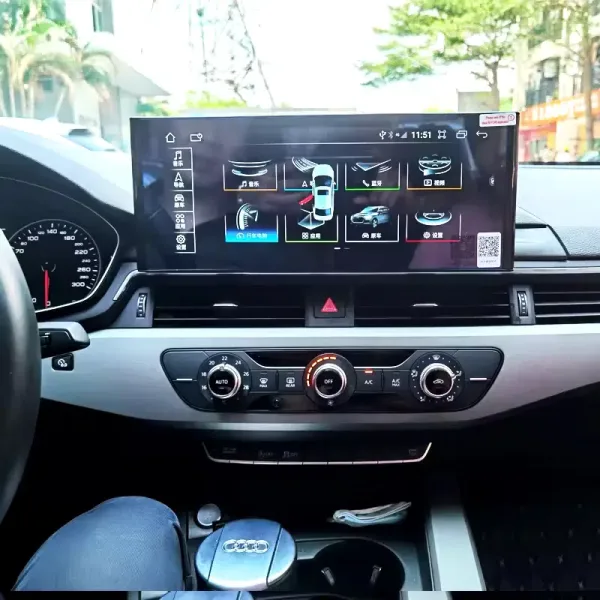
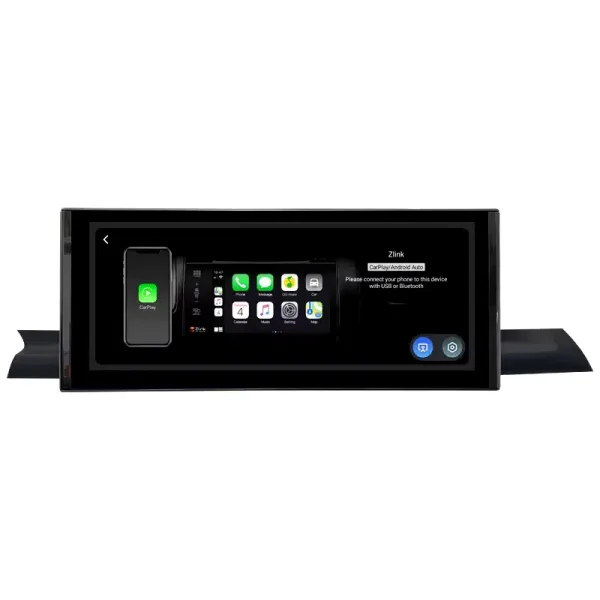
The driver display and centre display change different parts of the B9 experience. If your frustration is the factory centre screen, app access or multimedia, iKAGOO has a separate Audi A4 / A5 B9 Android and CarPlay route.
Audi A4 B9 / A5 B9 CarPlay Android Screen
This is the product shown in the installation image. It upgrades the centre infotainment area on supported 2017–2021 vehicles rather than replacing the instrument cluster.
If both areas bother you, the two upgrades can be considered separately: the cluster modernises what you see through the steering wheel; the Android screen modernises what you touch and use for media in the centre dashboard.
The same-looking cluster is not the same purchase once the dashboard is apart.
Before payment, different listings can look surprisingly similar. The difference becomes much easier to see when your installer asks which version you received, how the vehicle should be configured or why a required function is behaving differently.
Vehicle route, not just model name
When needed, iKAGOO reviews model year, steering side and original instrument information before the correct version is prepared.
Tell us why you are buying
If CarPlay Map Sync is central to your decision, state it so the required display route becomes part of the order context.
The order gives support context
Product version and order information give iKAGOO a clearer basis for installation guidance and troubleshooting.
O apoio continua após a entrega
Eligible products include a published 12-month limited hardware warranty plus continued troubleshooting, software guidance and parts assistance where applicable.
A4 B9, B9.5, A5 B9 and A4L are useful names—but the actual vehicle still decides fitment.
This article focuses on the Audi A4 B9 because that is the primary search and buying intent. The same product family also covers supported Audi A5 B9 configurations. Regional naming should help identify the vehicle; it should not replace an actual fitment check.
| Mercado | Common buyer wording | What iKAGOO still checks |
|---|---|---|
| United States / Canada | Audi A4 B9 · A5 B9 · B9.5 | Model year, original cluster and LHD configuration. |
| Reino Unido / Irlanda | A4 B9 Saloon · A4 Avant · A5 B9 | RHD position and original cluster route. |
| Europa | A4 B9 · A4 Avant · A5 B9 | Year, market equipment and original instrument layout. |
| Austrália / Nova Zelândia | A4 B9 · A5 B9 | RHD route and cluster configuration. |
| China | Audi A4L B9 | A4L badge alone is not enough; dashboard and instrument configuration should be confirmed. |
Useful information before shipment
- Exact Audi model and model year.
- Volante à esquerda ou volante à direita.
- Clear powered-on photo of the original cluster.
- Country or original vehicle market.
- Whether CarPlay Map Sync is an important buying requirement.
Do not choose the product from these alone
- “Another 2019 A4 owner installed one.”
- 12.3-inch screen size.
- A similar dashboard photo on a marketplace.
- An OEM donor-cluster retrofit guide.
- The assumption that every B9 has identical equipment.
Audi A4 B9 Virtual Cockpit Retrofit FAQ
Can I retrofit a Virtual Cockpit to an Audi A4 B9 that came with conventional gauges?
Yes. The current iKAGOO aftermarket route covers supported Audi A4 B9 and Audi A5 B9 configurations in the listed 2017–2025 range. Final product preparation follows the actual vehicle and supplied instrument information rather than the badge alone.
Why would I choose the iKAGOO route instead of a used OEM Virtual Cockpit?
The iKAGOO route is intended for owners who want a modern driver display, supported CarPlay Map Sync and one vehicle-specific purchase/support route. An OEM donor retrofit can be appropriate for owners who specifically want factory Audi hardware, but donor sourcing, Component Protection, additional connections and coding may become part of that project.
Can CarPlay navigation appear in the A4 B9 instrument cluster?
CarPlay Map Sync is a core listed feature of the supported iKAGOO cluster route. If this function is one of the main reasons you are buying, state it when the vehicle and order route are reviewed.
Can the factory Audi B9 Virtual Cockpit normally show my Google Maps or Apple Maps CarPlay map?
Do not assume that it can. On many B9 OEM configurations, Audi's own navigation and phone-based CarPlay or Android Auto navigation use different display routes. This is one reason CarPlay Map Sync can materially change the value of the aftermarket route for owners who rely on phone navigation.
Does this route fit Audi A4 B9 models from 2017–2025?
The current iKAGOO product route is listed for supported 2017–2025 A4 B9 / A5 B9 configurations. Model year is the starting point; original-cluster layout and steering position can also matter.
Does it also fit an Audi A5 B9?
Supported Audi A5 B9 configurations are included in the same listed 2017–2025 product route. The actual vehicle still needs to match the supported instrument configuration.
What about Audi A4 B9.5 models?
Buyers commonly use B9 and B9.5 names within the listed period. iKAGOO uses the actual model year and original-cluster information rather than relying only on the B9/B9.5 nickname.
Does the digital cockpit retain speed, RPM, fuel and trip information?
The matched route is designed to retain core driver information including speed, RPM, fuel, trip information and supported vehicle prompts. Required functions should be tested before final dashboard reassembly.
Does the iKAGOO route use the same Component Protection process as an OEM donor cluster?
No assumption should be made that the two routes are identical. The iKAGOO product is an aftermarket vehicle-specific cluster rather than a used OEM donor cluster. Its setup follows the confirmed iKAGOO product and vehicle configuration.
Does the A4 B9 aftermarket Virtual Cockpit require coding?
Setup requirements follow the matched vehicle and supplied product version. iKAGOO does not apply one blanket “no coding required” claim to every A4 B9 or A5 B9 configuration.
Does it support right-hand-drive A4 B9 vehicles?
The product interface includes LHD/RHD configuration. Buyers in the UK, Australia, New Zealand and other RHD markets should state the steering position when supplying vehicle information.
Should I buy the digital cluster or the Audi A4 B9 Android CarPlay screen?
Choose the digital cluster when the view behind the steering wheel is what you want to modernise. Choose the Ecrã CarPlay do Audi A4 B9 when your main goal is a larger centre display, wireless CarPlay, Android Auto, navigation and infotainment. They solve different parts of the same cockpit.
What should I send iKAGOO before the product is prepared?
Provide the exact vehicle model and year, LHD/RHD position and a clear powered-on photo of the original instrument cluster. Include your vehicle market if known and state clearly if CarPlay Map Sync is important to the purchase.
Why buy the Audi A4 B9 cluster from iKAGOO instead of the cheapest similar-looking listing?
Because the useful purchase is not only the LCD hardware. iKAGOO keeps the vehicle route, supplied product version, installation guidance and after-sales history tied to the original order. Eligible products also receive the published 12-month limited hardware warranty, with continued troubleshooting, software guidance and parts assistance available where applicable.
Keep the Audi. Change what you see every time you drive it.
If your A4 is still a car you trust and intend to keep, the argument for this upgrade is straightforward: modernise the part of the cockpit that is directly in front of you instead of replacing an otherwise good car just to obtain a newer driver interface.
O iKAGOO A4 B9 Digital Instrument Cluster combines the visible cockpit transformation with supported driving information and CarPlay Map Sync, while the original order remains the reference for product-version support after delivery.
If CarPlay map display is one of the main reasons you want the upgrade, make that requirement clear when your vehicle information is reviewed.
iKAGOO — Precision Fit. Premium Design. Professional Upgrades.








Add comment
Tem de iniciar a sessão para publicar um comentário.